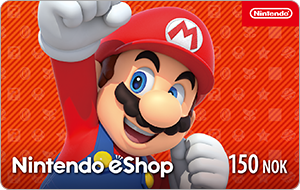
Nintendo Norway
⚡ Delivered in ~30 seconds
Region: Norway · code by e-mail + live tracking page
- ⚡ Livraison instantanée par e-mail
- 🔒 Paiement sécurisé — Visa · Mastercard · CMI
- 🎧 Support 7j/7 par ticket
About this card
Give friends, relatives or even yourself something to smile about with a Nintendo eShop Card! A Nintendo eShop Card is the perfect gift for anyone who likes to play and have fun! You can use the Nintendo eShop Card as a quick, safe and easy alternative to credit cards when purchasing games and other content on the Nintendo eShop or the official Nintendo website. Open the Nintendo eShop on your Nintendo Switch console, Wii U console or Nintendo 3DS system and you'll discover a world of games that can be purchased and downloaded instantly. You can use the Nintendo eShop Card to transfer money to your Nintendo eShop balance in five denominations: NOK 150, 250, 500, 750 and 1000. Please note that Nintendo eShop displays prices in the currency that corresponds to the country/region settings in your Nintendo Account.
How to use it
How to use the code with Nintendo Switch: Select "Redeem Code" or "Add Funds" in the Nintendo eShop and follow the on-screen instructions.
Buy Nintendo Norway in Morocco
Replay.ma is the fastest way to buy Nintendo Norway in Morocco: 100% secure payment with a Moroccan bank card (Visa, Mastercard, CMI) through Payzone, and instant digital delivery. As soon as payment clears you can track your order live and receive your code within seconds — from 215.88 Dhs. Every order includes a detailed activation guide, and our support replies quickly through a ticket.
More Nintendo cards
Frequently asked questions
How do I receive my Nintendo card in Morocco?
Pay with a Moroccan bank card (Visa, Mastercard, CMI) and your Nintendo Norway code appears immediately on your live tracking page, plus a copy by email. Delivery usually takes under 30 seconds.
How much does Nintendo Norway cost?
Nintendo Norway starts at 215.88 Dhs, with 5 amounts to choose from. Prices are updated regularly.
How do I redeem the Nintendo code?
After payment, click REDEEM on your delivery page: your code is shown along with a detailed step-by-step guide for the Norway region.